A320 EFIS & ND Trainer
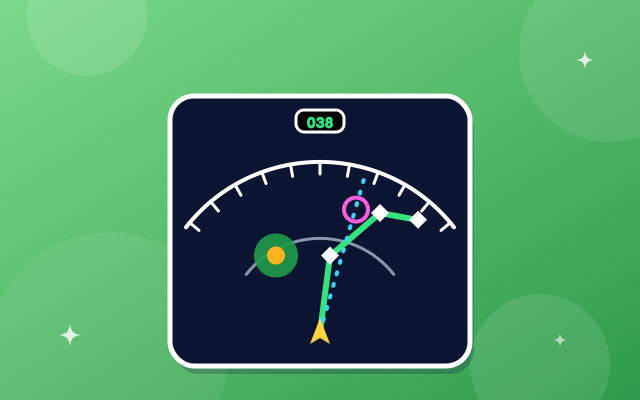
Set the EFIS control panel and see the navigation display change: ROSE, ARC and PLAN, range, and the map options.
EFIS control panel
ND mode
Range (NM)
Data on the map
ND switching: radar and traffic
Challenge
Test yourself
A320 EFIS & ND Trainer is part of lifetime access
Log in if you already have lifetime access, or unlock all 63 simulators, the full question bank and every flashcard for ₹3,499.
Or try the free ones: Wind Triangle and Altimeter.
Your account is on the free plan. Unlock all 63 simulators, the full question bank and every flashcard for ₹3,499, once.
Practise the questions
Displays and warnings12 questionsNavigation and air data12 questionsAutoflight and FMS12 questionsRevise with flashcards
Displays and warnings4 cardsNavigation and air data3 cardsAutoflight and FMS4 cardsWhat to try
- Switch between ROSE LS, ROSE VOR, ROSE NAV, ARC and PLAN and notice where the aircraft sits and what is drawn.
- Change the range and look at the ring that shows half the range. Weather and traffic fit the range you pick.
- Turn on CSTR, WPT, VOR.D, NDB and ARPT, and note which of them disappear in the VOR and LS modes.
- Do the five challenges, then take the quiz, which shows the display and asks which mode it is.
Exam point
ARC for en-route, ROSE NAV when you want to see all around you, PLAN to check or edit the route, ROSE LS for the ILS, ROSE VOR for a VOR radial. The active flight plan is green, selected targets are cyan, and managed or constraint items are magenta.
Study aid only. This is original teaching material, not Airbus or Boeing documentation. Layouts, values and procedures are simplified and can differ by aircraft version and operator, so always check your FCOM, QRH and course notes.